
Hydroponics Tracker
Most hydroponic failures are not knowledge problems. They are memory problems. You know the reservoir needs changing every two weeks, and then week three arrives and the water still looks clear. This free printable hydroponics tracker puts the whole routine on paper, next to the jar, where you will actually see it.
It covers one full 14 day reservoir cycle: a daily log for the top off, the pump, pH and EC, then a weekly root and leaf check and the day 14 change checklist. Two pages, free, no signup. Print it, tape it up, and cross off a box each time you check the water.
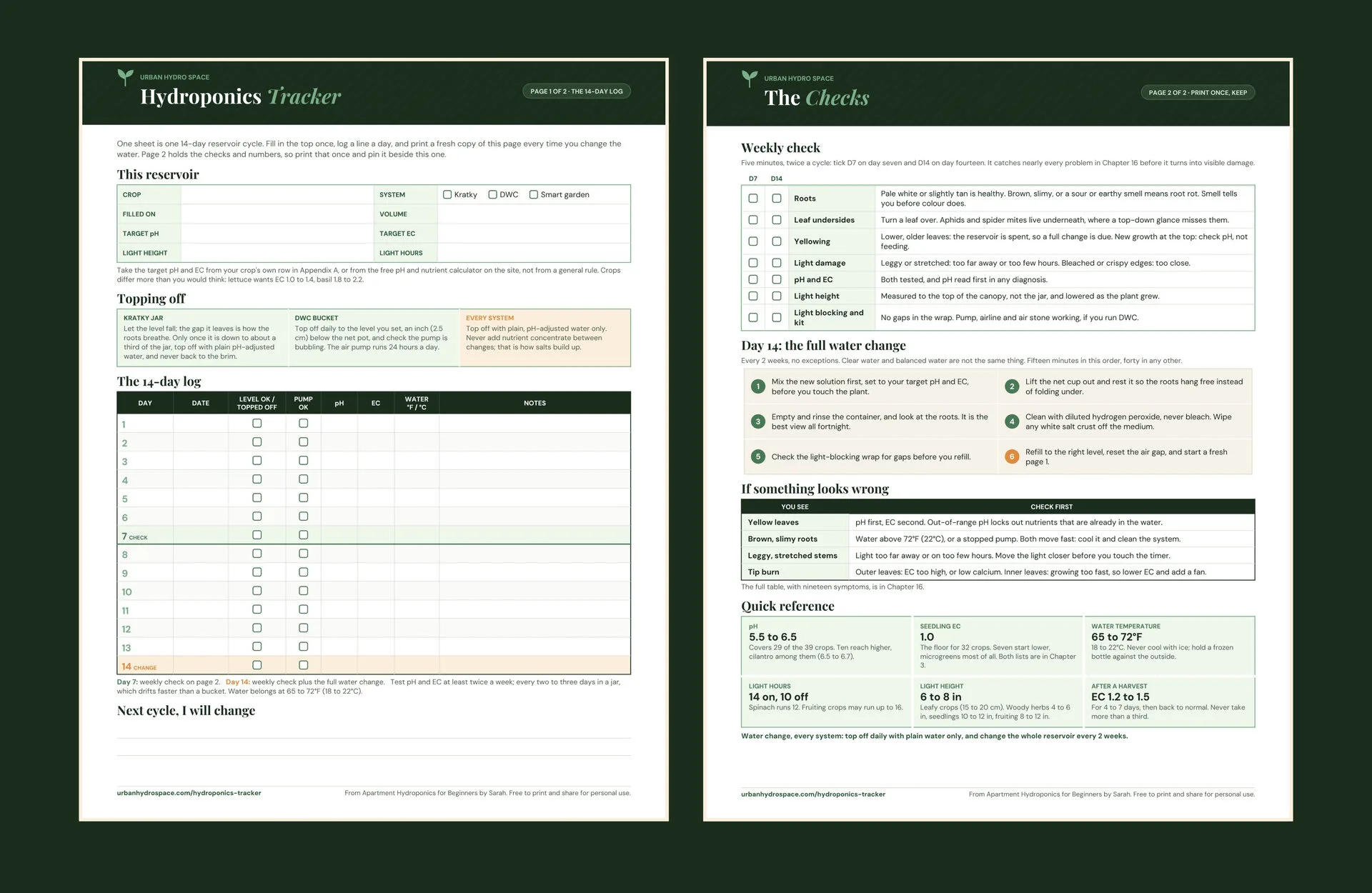
⬇️ Download the tracker
Two pages, PDF, free. Pick the paper size your printer uses.
📝 Page one: the 14 day log
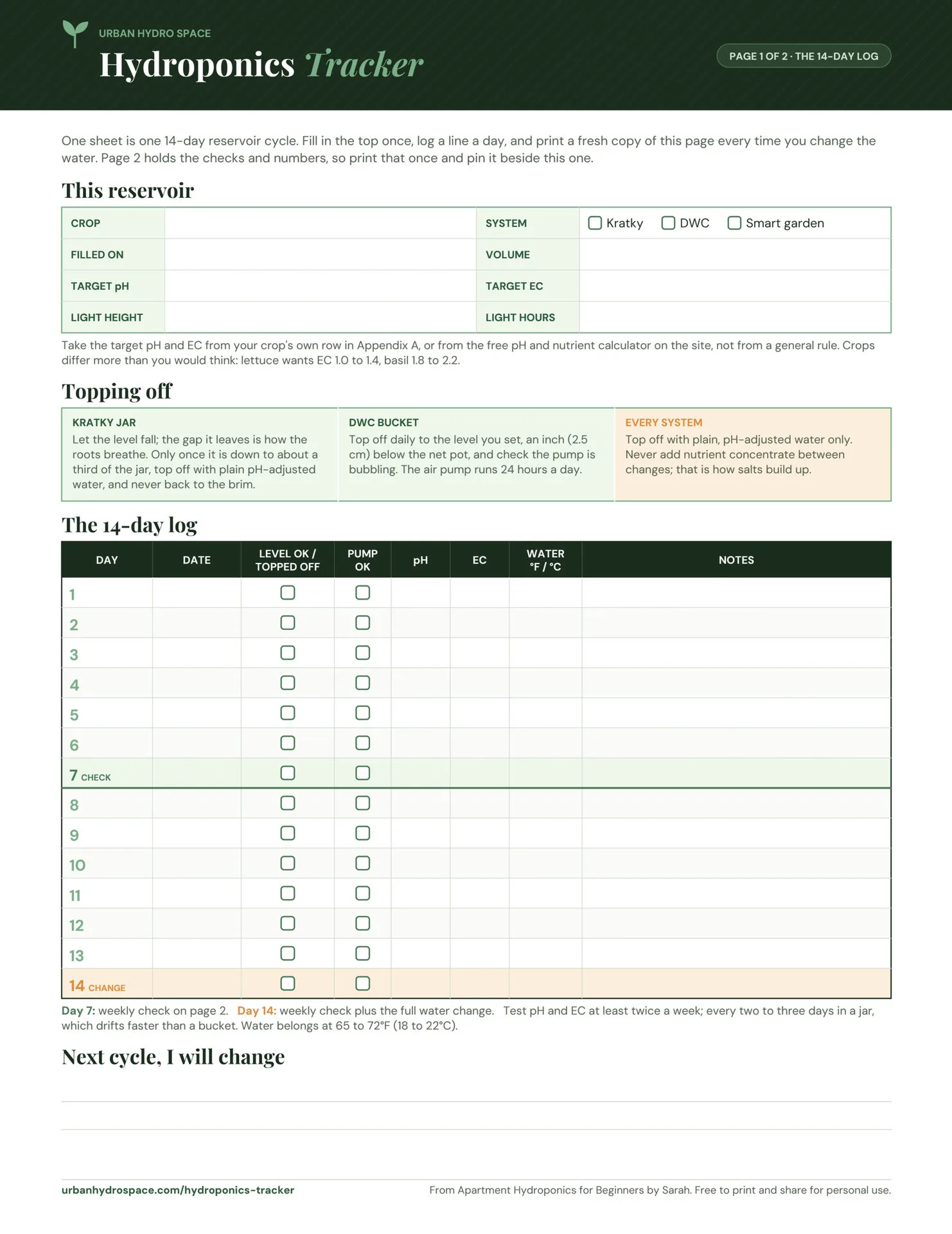
A box at the top for the crop, the system, the fill date, the reservoir volume, the light height and hours, and the target pH and EC for whatever is growing in it. Write those two numbers down and you stop guessing at them halfway through a cycle.
Then fourteen rows, one per day, with columns for the water level or top off, the pump, pH, EC, water temperature and a note. Day 7 is shaded green for the weekly check and day 14 is shaded amber for the full change, so the two dates that matter are visible without counting. Finally, a ruled space at the foot carries a lesson into the next cycle.
✅ Page two: the checks
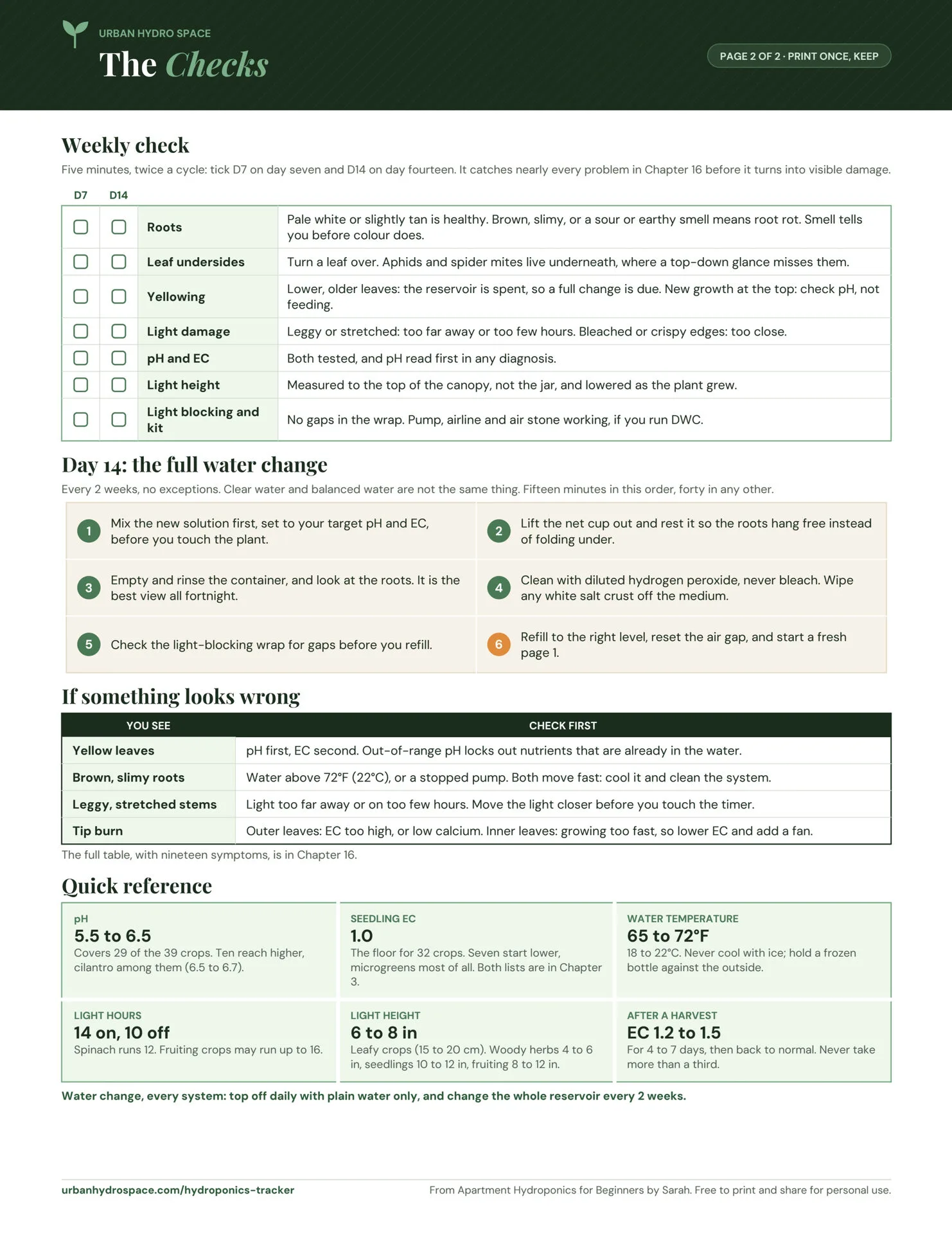
The weekly check, with a tick column for day 7 and another for day 14, because you run it twice per sheet. It also covers roots, leaf undersides, where yellowing sits on the plant, light damage, pH and EC, light height, and the pump.
Below that, the day 14 change in the order that makes it take fifteen minutes rather than forty, a short list of what to check first when something looks wrong, and the reference numbers: pH, EC, water temperature, light schedule and height, and what to do after a heavy harvest.
The pump column. A stopped air pump takes a healthy DWC bucket to brown, slimy roots inside a day, which is faster than anything else in this hobby goes wrong. However, it is a two second check: look for bubbles. Kratky growers can ignore that column entirely, since there is no pump to fail.
📋 How to use the hydroponics tracker
- Print both pages once. Choose US Letter or A4 to match your printer, and set scaling to 100 percent or actual size rather than fit to page, so the rows keep their proportions.
- Fill in the top box. Crop, system, fill date, volume, light height and hours, and the target pH and EC for that crop specifically. Use the pH and nutrient calculator if you are not sure what those two numbers should be.
- Tape page one next to the reservoir and pin page two beside it. A tracker in a drawer does nothing. The whole point is that it is already in front of you at the moment you check the water.
- Log the daily top off. Plain, pH adjusted water only, never nutrient concentrate. In a DWC bucket, top back up to the level you set and confirm the pump is bubbling. In a Kratky jar, let the level fall instead; if a long crop runs low, add a little nutrient solution, no more than about an inch.
- Run the weekly check on day 7 using page two, and tick the D7 column as you go. Five minutes, and it catches most problems before they show as damage on a leaf.
- Do the full change on day 14, work down the checklist in order, then start a fresh page one. After that, note anything worth changing in the box at the foot of the old sheet before you recycle it.
🧰 More free tools
📖 Complete Apartment Hydroponics Beginner Guide 🧪 pH and Nutrient Calculator 💡 Grow Light Calculator ⏳ Seed to Harvest Countdown 🛒 Beginner Shopping List Builder❓ Common questions about the hydroponics tracker
💸 Is the hydroponics tracker really free?
Yes. It is a free PDF download with no email signup, no account, and nothing to buy on the other end of the link. Print it as many times as you like. It is free to share with a friend or a class as long as you do not resell it.
🖨️ What paper size does the tracker print on?
Two versions are available. The US Letter file is 8.5 by 11 inches and the A4 file is 210 by 297 millimetres. Pick the one that matches your printer, because then nothing is scaled or clipped at the margins. Besides the paper size, both versions carry exactly the same content and layout.
📅 How many sheets do I need to print?
Print both pages once to start. Page two is the reference and never changes, so pin it up and leave it. Page one is the log, so print a fresh copy at the start of every 14 day cycle. That works out to roughly two sheets a month per reservoir.
🧪 Do I have to fill in the pH and EC columns every day?
No, but do not skip them either. Test at least twice a week, and every two or three days in a jar, since a small reservoir drifts faster than a bucket. Log the reading on the days you test and leave the cell blank on the days you do not.
💧 Why does the log treat Kratky and DWC differently?
Because a Kratky jar is designed for its water level to fall, and that falling level is what feeds the upper roots oxygen. A DWC bucket has a pump doing that job, so you top it back up to the level you set. In other words, topping a Kratky jar to the brim drowns the air roots.
📐 What do I put in the target pH and target EC boxes?
The numbers for the crop in that reservoir, not the general rule. Most crops want pH 5.5 to 6.5, cilantro and chives do best in the upper half at 6.0 to 6.5, and a few, like watercress, sit higher. Mature EC ranges from 1.0 for lettuce to 2.4 for mint. The pH and nutrient calculator gives you both.
🔌 Can I use the tracker with a smart garden or an AeroGarden?
Yes. Tick the smart garden box at the top and skip the pump column, since the unit handles aeration itself. The daily top off, the weekly leaf and root check, and the reservoir change on day 14 all still apply, and most all in one units do not remind you about any of them.
📖 Do I need the book to use the tracker?
No. The tracker is self contained and every number it references is printed on page two. The book explains why each of those numbers is what it is, and the chapter references on the sheet point there, but the sheet works perfectly well on its own next to a jar.
📱 Can I fill it in on my phone instead of printing it?
You can open the PDF on a phone and type into it with most PDF apps, though the sheet was designed for a pen next to the jar. The point of a paper tracker is that it is already in front of you when you check the water, which is exactly when a phone is not.
🌱 What do I do on day 15?
Day 14 is the full reservoir change, so day 15 is day one of a fresh sheet. Print a new page one, fill in the crop and the new fill date, and carry anything you learned across using the what to change next cycle box at the foot of the old sheet.
Print it, tape it up, and let the paper do the remembering.